NEAR
NEAR Intents
How a swap through NEAR Intents works in Hermit: the quote, the deposit, the signature check, the statuses and refunds.
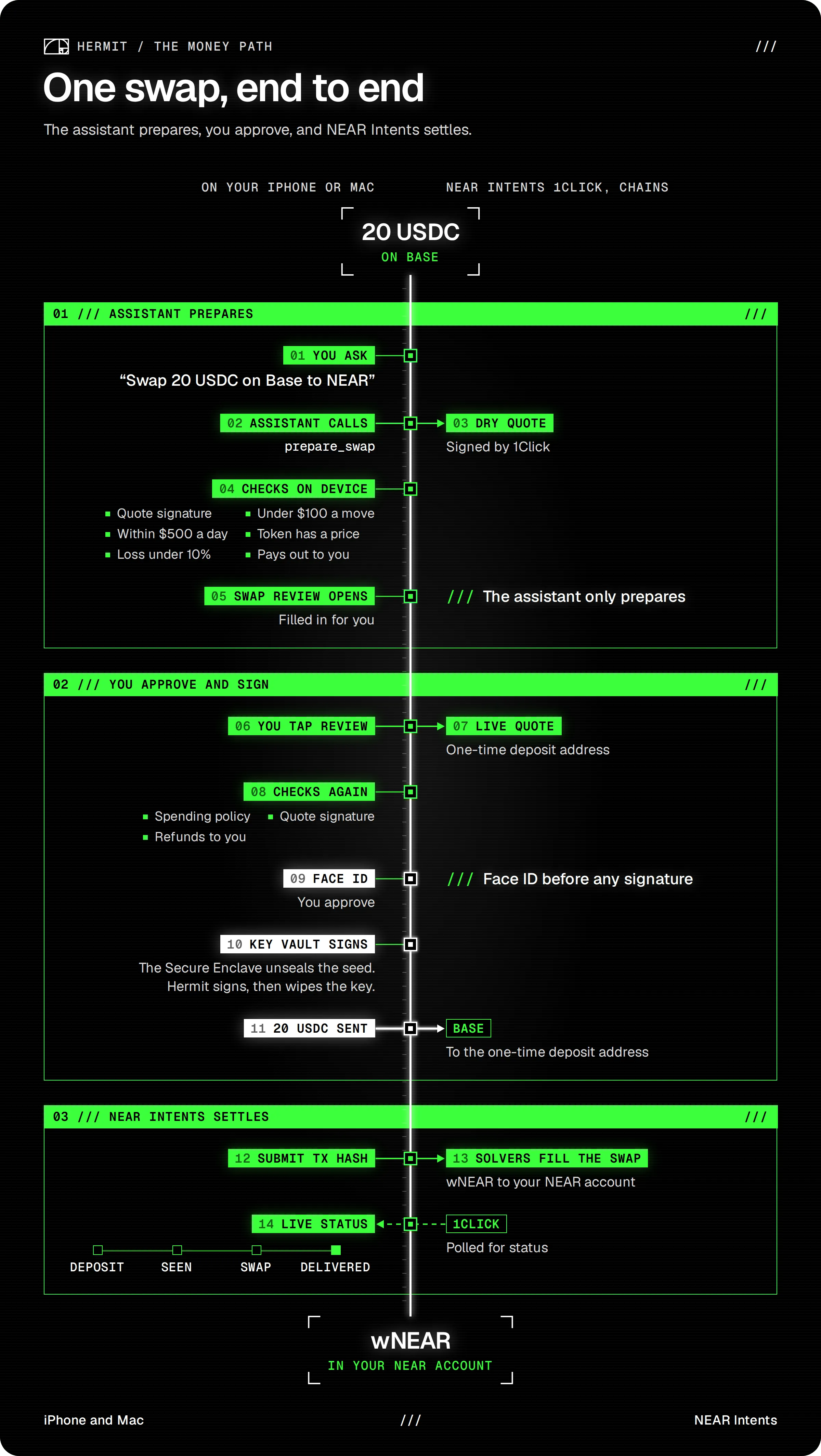
NEAR Intents is how Hermit swaps and bridges between chains. We talk to it through 1Click, its swap API. You never sign anything on NEAR Intents itself. You send one plain transfer from your wallet to a one-time deposit address, and 1Click does the rest.
Dry quotes and live quotes
Section titled “Dry quotes and live quotes”A dry quote prices a route and creates nothing. It has no deposit address, so there’s nothing you could send money to. Try a quote on the Wallets page, the price you see while you type on the Swap screen, and the assistant’s quotes in chat are all dry.
A live quote comes only when you tap Review. Hermit asks 1Click again with the same inputs, and this time the answer has a deposit address made for you. Slippage is 1%. If the live quote pays more than 1% less than the dry one you saw, Hermit stops and says “The price moved since the preview. Check the new amount and try again.”
How much NEAR would 10 USDC on Base get me?
- Getting a NEAR Intents quote for 10 USDC to NEAR
About how much NEAR you’d get, the cost and the time. Nothing is prepared, and no address is made.
What happens when you swap
Section titled “What happens when you swap”The Swap screen asks NEAR Intents and Relay at the same time and picks whichever pays out more. The lines under the amounts say which one won (“via NEAR Intents”) and what the other offered (“Also checked”). This is what happens when NEAR Intents wins.
-
Tap Review. The button reads “Getting a live quote” for a moment.
-
The review opens. It’s titled “Swap via NEAR Intents” (or “Bridge via NEAR Intents”) and lists You pay, You get, Route, Deposit to, Cost, Network fee, Time and Refunds to. Under that are the checks, including “One-time 1Click deposit address”, “Quote signed by 1Click” and “Refunds come back to you”.
-
Approve with Face ID. Hermit sends exactly the quoted amount to the deposit address, as an ordinary transfer from your wallet. A toast says “Deposit sent. Tracking the swap.”
-
Hermit tells 1Click the transaction hash, so it can start sooner, and opens the status sheet. It asks 1Click for the status every 5 seconds until the swap is delivered, refunded or failed.
-
When it’s done, the sheet says Delivered and shows what arrived, with a link to the transaction on the other chain.
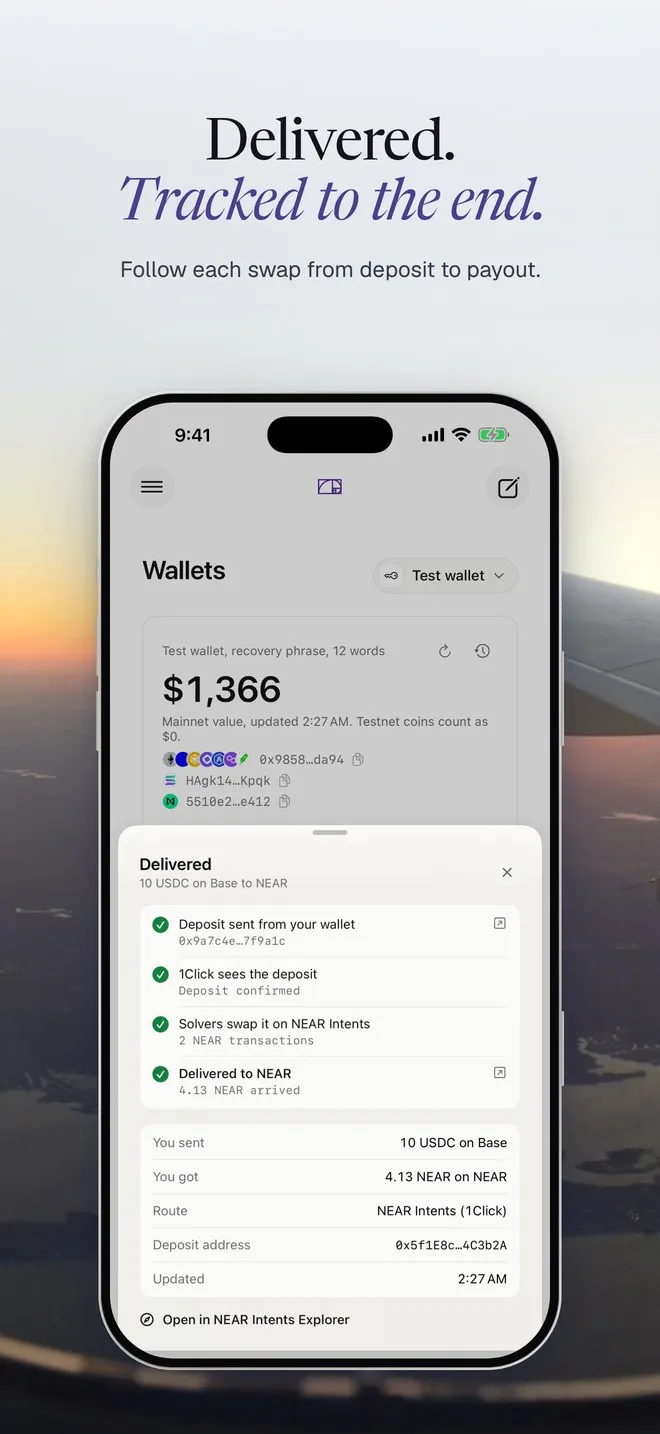
If you close the sheet, the swap keeps going. Swaps that haven’t settled show under “Swaps in progress” on the Wallets page. Tap one there to open its status again. Swaps show in Activity too.
Asking in chat
Section titled “Asking in chat”Swap 20 USDC on Base to NEAR
- Preparing the swap for your review
The Swap review opens, filled in. You still tap Review and approve it yourself.
The assistant can prepare a swap, never send one. It won’t prepare a move over its cap ($100 unless you change it in Wallets, Security), and it won’t prepare a swap that loses more than 10% of its value to fees and spread. It can quote a swap to Bitcoin but not prepare one, because it may not pick the address you’re paid at. You can still do all of these yourself from the Swap screen. A NEAR Intents swap that loses more than 3% gets a “Costly swap” warning in the review, whoever prepared it.
The signature check
Section titled “The signature check”1Click signs every quote with its own key. Before the review opens, your device checks that signature. We ported verifyQuoteSignature from 1Click’s TypeScript SDK (version 0.1.26) field for field, so the device builds the exact same message 1Click signed. If someone changed the amount or the deposit address on the way to you, the check fails.
When it passes, the review shows “Quote signed by 1Click”. When it doesn’t, you get “Quote signature not confirmed” as a warning instead, with a note to check the amount and the deposit address before you approve.
What each status means
Section titled “What each status means”These are the words Hermit shows, with 1Click’s own status name under each.
| You see | What’s going on |
|---|---|
Waiting for your depositPENDING_ |
1Click hasn’t seen money at the deposit address yet. |
Deposit seen, waiting for confirmationsKNOWN_ |
Your transfer is on chain and 1Click is waiting for it to settle. |
Solvers are filling the swap on NEAR IntentsPROCESSING |
The swap is happening. |
DeliveredSUCCESS |
The coins arrived where the quote said. |
Deposit was less than the quoteINCOMPLETE_ |
Less arrived than the quote needs. |
RefundedREFUNDED |
Nothing was swapped and your coins went back. |
Swap failedFAILED |
Nothing was delivered. |
Every status sheet has an Open in NEAR Intents Explorer link, so you can see the same swap on explorer.near-intents.org.
Refunds
Section titled “Refunds”Refunds go to your own address on the chain you sent from. Hermit fills that in from your wallet, and the review shows it under Refunds to. If you send from an exchange on Add funds and Hermit has no key on that chain (Bitcoin, say), it asks for your refund address there before it makes the deposit address.
- Refunded: the sheet says how much went back and to which address, and why when 1Click says, like “the quote expired” or “less than the quoted amount arrived”.
- Deposit was less than the quote: send the rest to the same address before the quote expires, or it all goes back to your refund address.
- Swap failed: 1Click returns deposits to your refund address, and the explorer shows where the funds are.
You can’t cancel a swap
Section titled “You can’t cancel a swap”Nobody can cancel a 1Click swap. Money that reaches a deposit address still swaps, even late. So Hermit never pretends to cancel one.
On a waiting swap you can tap Hide from list. It disappears from Swaps in progress, but Hermit keeps checking it, so if your deposit lands it still shows in Activity with its real status. A finished swap can be removed with Remove from list. On Add funds, Start over hides the old address the same way and asks for a new one. An address nobody sends to simply expires.
Confidential swaps
Section titled “Confidential swaps”1Click charges an extra 0.2% on quotes from apps without a partner key. When that fee applies, the Cost line in the review says so, for example “$0.03, incl. 0.2% API fee”.
Our TestFlight builds carry our partner key, so you usually won’t see that fee there. You can also paste your own key in Wallets, Security, under NEAR Intents. That card shows where the key comes from: Set, Hermit’s, built in, or “Not set, 0.2% API fee”.
With a partner key you also get the Confidential swap switch on the Swap screen. It asks 1Click for a confidential swap, and the switch’s note reads “Deposit and payout can’t be linked on chain.” Relay isn’t asked for those quotes. Without a key the switch is greyed out and says “Needs a 1Click partner key (Wallets, Security).”
Why you see wNEAR
Section titled “Why you see wNEAR”1Click prices native NEAR as the token wNEAR (wrap.near). Hermit shows it as NEAR and leaves wNEAR out of its token pickers. The quote itself, the explorer and our Python script still say wNEAR, and the review adds a “Moves as wNEAR” line so it doesn’t surprise you. When you swap from NEAR, you send plain NEAR to the deposit account and 1Click wraps it. Hermit doesn’t wrap or unwrap anything itself.
Want to see a quote and its signature check outside the app? Step 1 of Check it yourself runs one in a few seconds.