Developers and help
Troubleshooting
A stuck download, a waiting swap, a missing key, and the other things that go wrong, under the words the app shows.
Most headings below are what the app says, word for word. If you paste a message into search, it should land you here. On a Mac, read Touch ID where it says Face ID, and “this Mac” where it says “this phone”.
The model download
Section titled “The model download”You can watch it next to Send (it reads “Hermit 1.2 42%” while it downloads) and in Settings, Models.
“Download stopped”
Section titled ““Download stopped””Hermit already retried on its own, three times, before it said this. The line under the model says why:
- “No internet connection.” Get online and tap Try again.
- “The connection kept dropping. Try again on a steadier network.” Wi-Fi beats mobile data here.
- “The download server answered 503. Try again in a little while.” Our mirror or Hugging Face had a bad moment. Wait a few minutes.
- “model.safetensors failed its checksum.” A piece came down damaged and was thrown away. Try again fetches it again.
Nothing you already downloaded is lost. Hermit picks up where it stopped.
“Not enough space. Hermit needs 2.7 GB free and this iPhone has 1.1 GB.”
Section titled ““Not enough space. Hermit needs 2.7 GB free and this iPhone has 1.1 GB.””Retrying won’t help, so it stops at once. Free up the space it names, then tap Try again.
“Paused at 1.2 GB of 2.3 GB”
Section titled ““Paused at 1.2 GB of 2.3 GB””You or iOS paused it. Tap Resume. On an iPhone the Live Activity says “Paused. Open Hermit to continue.” when iOS stopped it in the background.
“Waiting for Wi-Fi”
Section titled ““Waiting for Wi-Fi””You answered “Wait for Wi-Fi” to “Download Hermit’s AI now?” on mobile data. It starts by itself on Wi-Fi. To use mobile data anyway, tap Download in Settings, Models.
“Needs 7 GB of memory”
Section titled ““Needs 7 GB of memory””Your iPhone can’t run Hermit 1.2, so it gets Hermit 1.1 Lite, which is about 1 GB. If Lite also says “Needs 5 GB of memory”, your iPhone has 4 GB and can’t run either model. Use Private Cloud. See the model and its tools.
Swaps through NEAR Intents
Section titled “Swaps through NEAR Intents”A swap’s status sheet tracks four steps: deposit sent, 1Click sees the deposit, solvers swap it, delivered.
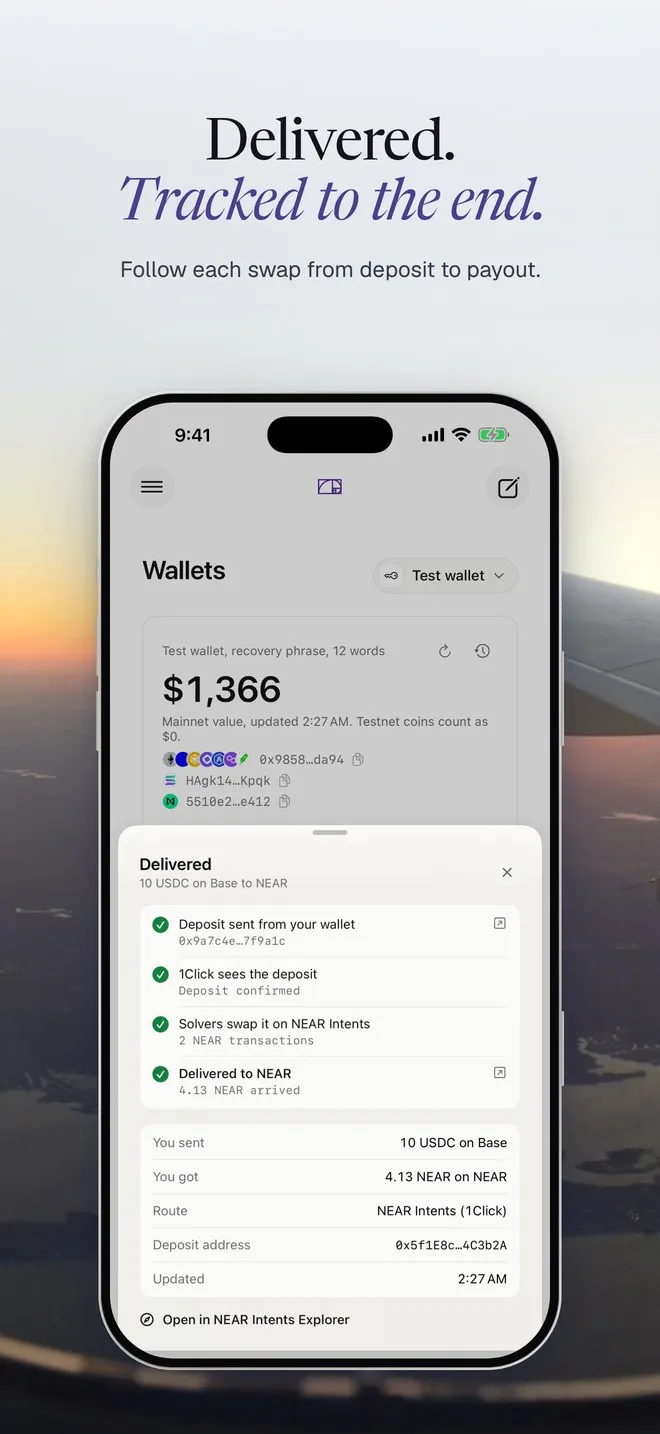
“Waiting for your deposit”
Section titled ““Waiting for your deposit””1Click hasn’t seen your coins at the deposit address yet. If Hermit sent them, the chain is usually still confirming, so give it a minute. If you’re sending from somewhere else, as with Add funds, it waits until they arrive.
Tap Keep waiting to leave it be. Hide from list only hides it. If you already sent funds, they still arrive and show in Activity. You can’t cancel a NEAR Intents swap once the coins are sent. An address nobody sent to just expires.
“Deposit was less than the quote”
Section titled ““Deposit was less than the quote””Less arrived than the quote needs. The sheet says how much. Send the rest to the same address before the quote expires, or 1Click sends it all back to your refund address.
“Refunded”
Section titled ““Refunded””The sheet reads something like “Refunded 20 USDC to 0x9858…da94 (the quote expired). Nothing was swapped.” Your coins went back to your own address on the chain they came from. Check Activity, then get a fresh quote and try again.
“Swap failed”
Section titled ““Swap failed””Nothing was delivered, and 1Click returns deposits to your refund address. Tap Open in NEAR Intents Explorer to see where the funds are right now. If they’re still not back after an hour, email us with the deposit address.
“Quote signature not confirmed”
Section titled ““Quote signature not confirmed””Hermit checks 1Click’s signature on every quote before you approve. Quotes with Bitcoin on either side are the one case where 1Click’s own SDK fails the check too, so you’ll mostly see this when you swap to BTC. The quote still came from 1Click over HTTPS, but nothing proves it wasn’t changed. Check the amount and the deposit address before you approve.
In Add funds the same thing reads “This quote’s 1Click signature didn’t check out on this phone”. The deposit address stays hidden until you tap I’ve checked it.
Private Cloud
Section titled “Private Cloud”“Private Cloud needs a key”
Section titled ““Private Cloud needs a key””Chat in Private Cloud needs a NEAR AI Cloud key. Our builds come with a shared one, but builds without it, like your own from the repo, need yours. Go to Settings, Cloud and paste a key from cloud.near.ai. The enclave check still runs without a key.
“…there’s no NEAR AI Cloud API key yet, so I didn’t send your message.”
Section titled ““…there’s no NEAR AI Cloud API key yet, so I didn’t send your message.””Same fix. Your message never left your device.
“…today’s 30 free Private Cloud messages are used up, so I didn’t send your message.”
Section titled ““…today’s 30 free Private Cloud messages are used up, so I didn’t send your message.””The shared key allows 30 messages a day on each device. Add your own key in Settings, Cloud for no limit, or switch to On-device from the model name next to Send. The count starts over tomorrow.
“NEAR AI didn’t accept this key. Check it and try again.”
Section titled ““NEAR AI didn’t accept this key. Check it and try again.””The key was mistyped or revoked. Copy it again from cloud.near.ai. If it says “Your NEAR AI Cloud credits have run out”, add credits there.
“I couldn’t get NVIDIA’s verdict on the enclave’s GPUs, so I didn’t send your message.”
Section titled ““I couldn’t get NVIDIA’s verdict on the enclave’s GPUs, so I didn’t send your message.””NVIDIA’s attestation service didn’t answer. Hermit won’t send without it. Try again in a moment. The Private Cloud proof explains every check.
Hyperliquid
Section titled “Hyperliquid”“No funds on Hyperliquid”
Section titled ““No funds on Hyperliquid””Your Hyperliquid account is empty. Trade offers a Deposit button, or ask Hermit “add funds to Hyperliquid” and tap the button it shows. Hermit picks the cheapest route itself, and the USDC lands in about a minute.
“This wallet has no Hyperliquid account yet. Deposit USDC first.”
Section titled ““This wallet has no Hyperliquid account yet. Deposit USDC first.””Hyperliquid only opens an account when the first USDC arrives. Deposit, wait for it to land, then place the order again.
“Hyperliquid’s bridge needs at least 5 USDC.”
Section titled ““Hyperliquid’s bridge needs at least 5 USDC.””Hyperliquid’s own bridge has a 5 USDC minimum. Your USDC is safe in your wallet on Arbitrum. Send 5 or more.
“Needs a little ETH on Arbitrum for the network fee”
Section titled ““Needs a little ETH on Arbitrum for the network fee””The bridge deposit is an Arbitrum transaction, so it needs a bit of ETH there. The message names the amount. Nothing was sent.
The assistant says there isn’t enough margin
Section titled “The assistant says there isn’t enough margin”When you ask for a trade your Hyperliquid balance can’t cover, Hermit tells you how much USDC is free and how much the order needs, and shows an Add funds to Hyperliquid button. Deposit more, or ask for a smaller size.
Solana spot and memes
Section titled “Solana spot and memes”“Add a little SOL on Solana first. It pays the network fee.”
Section titled ““Add a little SOL on Solana first. It pays the network fee.””Every Solana transaction pays its fee in SOL, even when you buy with USDC. Send a little SOL to your Solana address and try again. When you pay with SOL, Hermit keeps about 0.01 SOL back for the fee and a new token account. Spot and Memes are in the Mac download now and come to TestFlight with the next build.
Calendar
Section titled “Calendar”“Calendar access is off”
Section titled ““Calendar access is off””You said no when Hermit asked, or turned it off later. Tap Open Settings and turn on full access to Calendars for Hermit. On a Mac it opens Privacy & Security, Calendars.
“Hermit can add events but not read them”
Section titled ““Hermit can add events but not read them””You gave add-only access. Hermit can put events in your calendar but can’t show them. Turn on full access the same way. See Calendar.
Automations
Section titled “Automations”“It runs when you press Run now.”
Section titled ““It runs when you press Run now.””You have a TestFlight build from before schedules. Your automations run when you open one and tap Run now. Scheduled runs are in the Mac download now and come to TestFlight with the next build.
An automation didn’t run
Section titled “An automation didn’t run”Automations run on your device, only while Hermit is open. We have no server to run them for you. If Hermit was closed at the time, you get a notification like “Due at 09:00. Open Hermit to run it.” Open Hermit and it runs once, however many times it was due.
On an iPhone, iOS stops the model when Hermit leaves the screen. A run in progress stops and runs again when you come back.
“Morning brief runs as soon as Hermit is free”
Section titled ““Morning brief runs as soon as Hermit is free””Hermit was busy answering you. It runs right after.
“Hermit can’t plan “every 2 hours” yet, so it runs when you press Run now.”
Section titled ““Hermit can’t plan “every 2 hours” yet, so it runs when you press Run now.””Some schedules don’t fit yet, like every 2 hours, weekdays or monthly. Every few minutes, every hour, every day at a time and a weekday at a time all work. See Automations.
Still stuck?
Section titled “Still stuck?”Email contact@hermit.my with what the app said and what you did just before. Leave out your recovery phrase. We’ll never ask for it.