Developers and help
Architecture
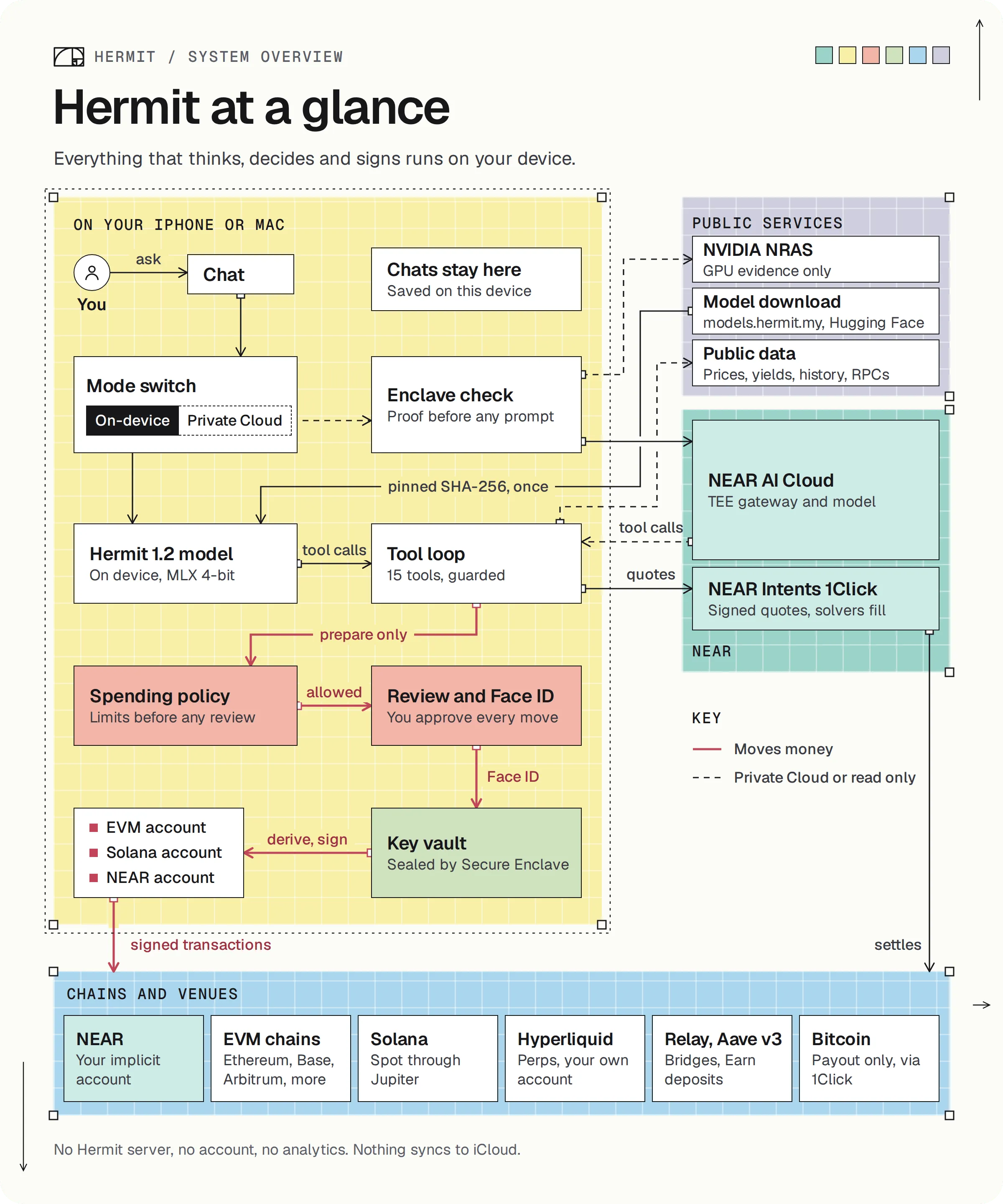
How a message turns into a prepared move, and which package holds which part.
Hermit is two thin apps around one Swift package. Almost everything lives in Packages/HermitKit. The iPhone and Mac apps only start it up.
What happens when you send a message
Section titled “What happens when you send a message”Say you type “swap 20 USDC on Base to NEAR”.
-
The model reads it. By default that’s Hermit 1.2, running on your device with MLX. In Private Cloud mode your device first checks the NEAR AI Cloud enclave’s proof, and only then sends the prompt, on that same connection.
-
The model calls a tool. That’s all it can do. Here it calls
prepare_swap. Tools run on your device in both modes, so Private Cloud never touches your wallet. -
The guard and the spending policy look at the call. The guard refuses a transfer to an address you never typed. The policy checks your daily limit and the assistant’s $100 per move.
-
A review opens, and the step line in chat reads “Preparing the swap for your review”. The review shows the amounts, the route and the checks it ran.
-
You approve with Face ID (Touch ID on a Mac). Only then does the Secure Enclave let the key sign. For a NEAR Intents swap, the signed transfer goes to a one-time deposit address.
The tool loop gives the model up to five rounds per message, and up to six tool calls in a round. A prepared move is never a done move. The chat only says something happened when a tool says so.
The packages
Section titled “The packages”HermitKit has six targets. The first five do the real work. The sixth is tiny.
| Package | What’s in it |
|---|---|
HermitCore |
The tool loop. It renders the prompt, parses tool calls, cleans tool results and guards the money tools (ToolLoop.swift, ToolCalls.swift, AgentTools.swift, HermitPrompt.swift). No UI. |
HermitModel |
The on-device models and their download (ModelCatalog.swift, ModelPins.swift, ModelSources.swift, ModelStore.swift, LocalAgent.swift). This is the only package that pulls in MLX. |
HermitCloud |
Private Cloud on NEAR AI Cloud: the attestation checks, the TLS binding, the response signatures and the cloud agent (NearAICloud.swift, TDXQuote.swift, NearCloudAgent.swift). |
HermitWallet |
Keys and chains (KeyVault.swift, Chains.swift), the spending policy (SpendPolicy.swift), NEAR and NEAR Intents, batch sends, Hyperliquid, Jupiter, Aave, and the browser wallet (Dapps/). |
HermitUI |
Every screen in SwiftUI, the review (ApprovalSheet.swift), the shared toolbox both chat modes use (Cloud/HermitToolbox.swift) and the automation scheduler. |
HermitActivity |
The model download’s Live Activity data, shared with the iPhone widget extension. It has no dependencies. |
HermitUI depends on the other four. HermitCore depends on nothing, which is why the tests can build it without MLX or SwiftUI.
The app targets
Section titled “The app targets”project.yml makes three targets with XcodeGen:
Hermit, the Mac app.HermitiOS, the iPhone app.HermitWidgets, the iPhone widget extension. For now it only draws the model download’s Live Activity.
Where to start reading
Section titled “Where to start reading”DirectoryApp/
- Shared/HermitApp.swift the app’s entry point, the same on both
- Widgets/HermitWidgets.swift
DirectoryPackages/HermitKit/
- Package.swift
DirectorySources/
- HermitCore/ToolLoop.swift start here for the agent
- HermitUI/Cloud/HermitToolbox.swift what each tool really does
- HermitWallet/SpendPolicy.swift the rules a move has to pass
- HermitWallet/KeyVault.swift how the keys are sealed
DirectoryTests/
- …
Directorydocs/
- …
Directorynear/ the Python checks
- …
Directoryscripts/
- …
- project.yml
Every dependency is pinned to an exact version in Package.swift: swift-secp256k1 0.23.2, CryptoSwift 1.9.0, mlx-swift 0.32.3, mlx-swift-lm 3.32.3 and swift-transformers 1.3.5.
- Build the apps yourself.
- The model and its tools lists every tool.
- Prompt injection shows the guard stopping an attack.