NEAR
Your NEAR account
The NEAR account every wallet gets, made on your device from your recovery phrase, and how to fund it and send from it.
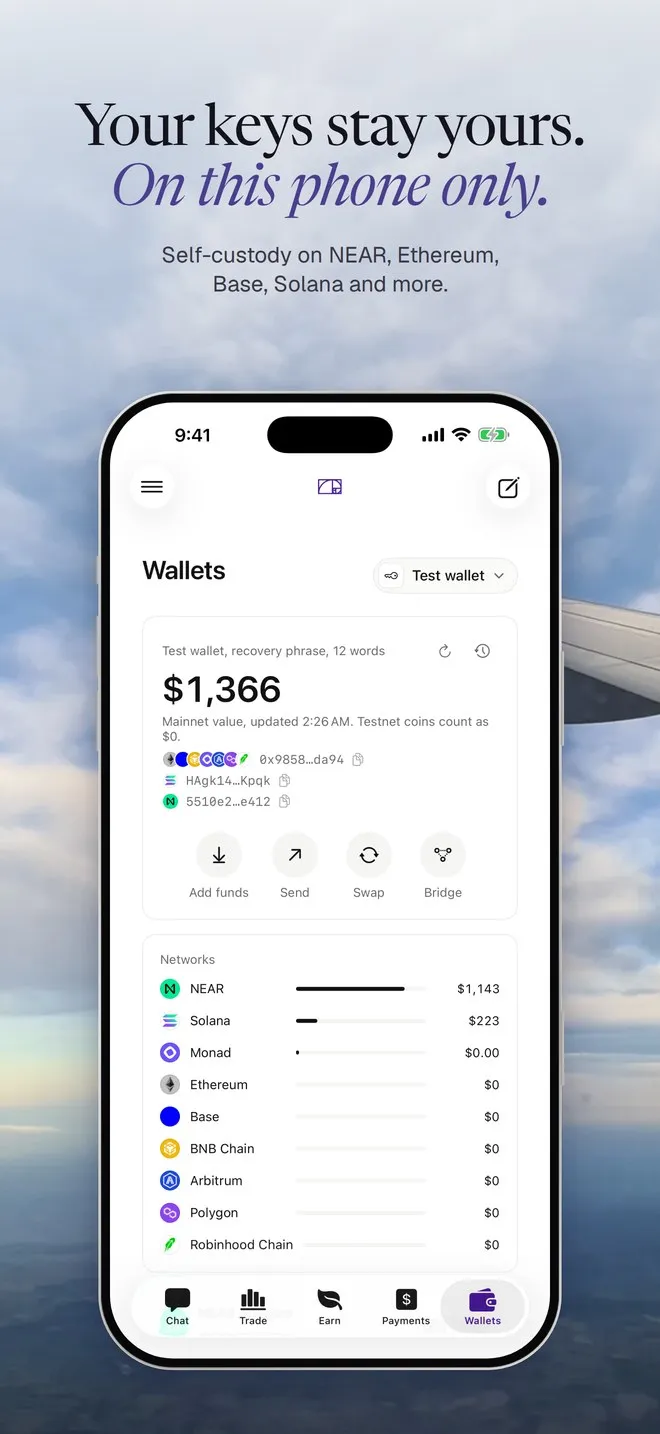
Every Hermit wallet has a NEAR account next to its EVM and Solana addresses. You don’t sign up for it. Your device works it out from your recovery phrase, and the key never leaves the device.
Where it comes from
Section titled “Where it comes from”Hermit derives an ed25519 key from your words at the path m/44'/397'/0' (SLIP-10). That’s the same path near-seed-phrase and MyNearWallet use, so the same words give the same account there.
The account is an implicit account. Its name is the public key written as 64 hex characters, like 5510e2b4...ee412, rather than a name like alice.near. You’ll see it shortened on the wallet card, and the full path is listed in Wallets, Security, as NEAR path.
Find it and copy it
Section titled “Find it and copy it”On the Wallets page, the NEAR account card sits under your wallet. Tap the account to copy it. A toast says “NEAR account copied”. You can also tap Add funds and pick NEAR to get it with a QR code.
It starts once it gets NEAR
Section titled “It starts once it gets NEAR”An implicit account only exists on chain after it receives NEAR for the first time. Until then the card says “Waiting for its first NEAR” and suggests sending about 0.01 NEAR, or swapping into NEAR from another chain. Hermit doesn’t show a zero balance as if the account were live.
Swap 10 USDC on Base to NEAR
- Preparing the swap for your review
The Swap review opens. When you approve it, the NEAR lands in your NEAR account, and that first deposit is what brings the account to life.
Balances
Section titled “Balances”Hermit reads your balances from FastNEAR’s public RPC: NEAR, plus USDC, USDT and wNEAR (NEP-141 tokens). The NEAR amount is what you can spend. It leaves out the small storage reserve every NEAR account has to keep, so the card’s “available” figure can be a little under what an explorer shows.
Send NEAR or tokens
Section titled “Send NEAR or tokens”-
On the Wallets page, tap Send and pick NEAR as the network.
-
Type a NEAR account, like
alice.nearor a 64-character implicit account, or pick a saved address. Hermit reads it in lowercase. -
Enter the amount and tap Review. NEAR has no way to dry-run a transaction, so Hermit reads the chain instead: your balance covers the amount and the fee, and the receiver is real. A named account that doesn’t exist yet stops here with “alice.near doesn’t exist on NEAR.”
-
Check the review and approve with Face ID (Touch ID on a Mac).
Behind the scenes, NEAR goes out as a plain Transfer. Tokens go out as ft_transfer with 1 yoctoNEAR attached, which the token standard requires. If the receiver has never held that token, Hermit puts a storage_deposit of 0.00125 NEAR in front of it in the same transaction, so the transfer doesn’t fail. That deposit is counted in the fee the review shows.
Hermit builds the transaction byte for byte the way near-api-js does, signs it on the device, and checks its own signature before sending. If that check fails, you see “Signed transaction failed its self-check. Nothing was sent.” Then it waits until the transaction has run. A NEAR transaction can be accepted while one of its later steps fails, so Hermit looks at every step and reports a failure as a failure.
Pay a NEAR account
Section titled “Pay a NEAR account”You can save NEAR accounts as payees. In Payments, the address field takes “0x…, name.eth, Solana or NEAR”. In the Send sheet, Save an address has a NEAR type. A NEAR account you haven’t saved shows “NEAR account, new” as a warning before you send.
Swap from NEAR
Section titled “Swap from NEAR”Your NEAR account can be the sending side of a NEAR Intents swap, and it’s where refunds go when a swap from NEAR doesn’t go through.
Wallets made before NEAR
Section titled “Wallets made before NEAR”If you made your wallet before we added NEAR, the card says “Not added to this wallet yet” with an Add button. Working out the account needs your key, so Hermit asks for Face ID once (“Add a NEAR account to this wallet”). Then it saves the account, and a toast says “NEAR account added”. The Swap screen offers the same button when you pick NEAR on either side.
Want to see the same derivation outside the app? Step 4 of Check it yourself works out the account from a public test phrase and compares it with our test vectors.