NEAR
The Private Cloud proof
What your device checks before your message goes to NEAR AI Cloud, what it checks on the reply, and what nobody can check yet.
In Private Cloud mode your question goes to a bigger model that NEAR runs inside a hardware enclave: Intel TDX with NVIDIA GPUs in confidential mode. “Trust us, it’s an enclave” isn’t good enough for us, so your device asks for proof before every message and checks it itself. If anything doesn’t add up, your message stays on your device.
What you see
Section titled “What you see”Tap the model name next to Send and pick Private Cloud. A toast says “Private Cloud on. The enclave is checked before every message”.
What's a good way to split $200 between ETH and SOL?
- Checking the enclave…
- Thinking in the enclave…
- Checking the reply's signature…
The answer, with a Verified in a TEE chip under it. Tap the chip to see every check.
Those three step lines are the whole proof in motion. The rest of this page is what happens inside each one.
- Device 1 Makes a nonce 32 random bytes, new for this reply
- Device → NEAR AI Cloud 2 Asks for the attestation report The nonce, no API key, on one HTTPS connection it watches
- NEAR AI Cloud → Device 3 Sends the evidence TDX quotes, event logs, GPU evidence, the TLS key fingerprint
- Device 4 Checks the enclaves Quote, Intel chain, debug off, nonce, signer, MRCONFIGID, RTMR3, TLS key
- Device → NVIDIA 5 Sends the GPU evidence Only NVIDIA can judge it
- NVIDIA → Device 6 Returns a signed verdict Device checks the ES384 signature, issuer, time and nonce
- Any check failed? Nothing is sent.
- Device → NEAR AI Cloud 7 Sends your prompt On that same connection, after the checks
- NEAR AI Cloud → Device 8 Sends the reply
- Device → NEAR AI Cloud 9 Fetches the reply’s signature /v1/signature/{id}
- Device 10 Checks the signature Hashes the exact bytes, recovers the signer, compares it to the attested model key
Before your message leaves
Section titled “Before your message leaves”This runs for every reply. Hermit never reuses old evidence.
- A fresh nonce. Your device makes 32 random bytes and opens one HTTPS connection to NEAR AI Cloud’s gateway,
cloud-api.near.ai, that it watches. - The report. On that connection it asks for
/v1/attestation/reportwith the nonce. It sends no API key, so nothing about you leaves yet. - The checks. For the gateway and for each copy of the model you picked, your device checks:
- the Intel TDX quote’s signature, and that Intel’s Quoting Enclave certified the key behind it, with the certificate chain up to Intel’s SGX Root CA (we ship a copy of that root in the app) and every certificate in date
- that debug mode is off
- that the quote contains your nonce, so it was made just now, for you
- that the quote binds the key the enclave signs replies with
- that
SHA-256(app_compose)equals MRCONFIGID, which pins the enclave’s configuration - that the event log replays to RTMR3, which pins what ran after boot
- that the evidence is for the model you asked for, and the GPU evidence carries your nonce
- that the connection you’re on ends at the TLS key the gateway’s quote names
- NVIDIA’s verdict. Only NVIDIA can judge the GPU evidence, so your device sends it to NVIDIA’s attestation service (NRAS). It then checks the token that comes back: an ES384 signature by one of NVIDIA’s published keys, NVIDIA as the issuer, inside its time window, and carrying this request’s nonce.
If any check fails, you get “I didn’t send your message. The enclave’s evidence failed:” followed by the checks that failed. If NVIDIA can’t be reached, you get “I couldn’t get NVIDIA’s verdict on the enclave’s GPUs, so I didn’t send your message.” Either way, nothing left your device.
After the reply comes back
Section titled “After the reply comes back”Your prompt goes out on that same verified connection, in one piece, without streaming and with the header x-no-aliasing: true. If the connection was re-opened in between, the sheet says so.
Then your device fetches the reply’s signature from /v1/signature/{id}. The enclave signed a short text: the model name, the SHA-256 of the request and the SHA-256 of the response. Your device hashes the exact bytes it sent and received, builds the same text, recovers the signer from the EIP-191 signature, and requires it to be the model key it just verified.
If the reply prepared a move or a card and its signature doesn’t check out, Hermit drops the buttons: “The reply’s signature didn’t verify, so I left out its review buttons. Try again.”
The Verified sheet
Section titled “The Verified sheet”Tap the chip under a reply to open the sheet. It lists every check and who did it: your device (“This phone” or “This Mac”), NVIDIA, or nobody.
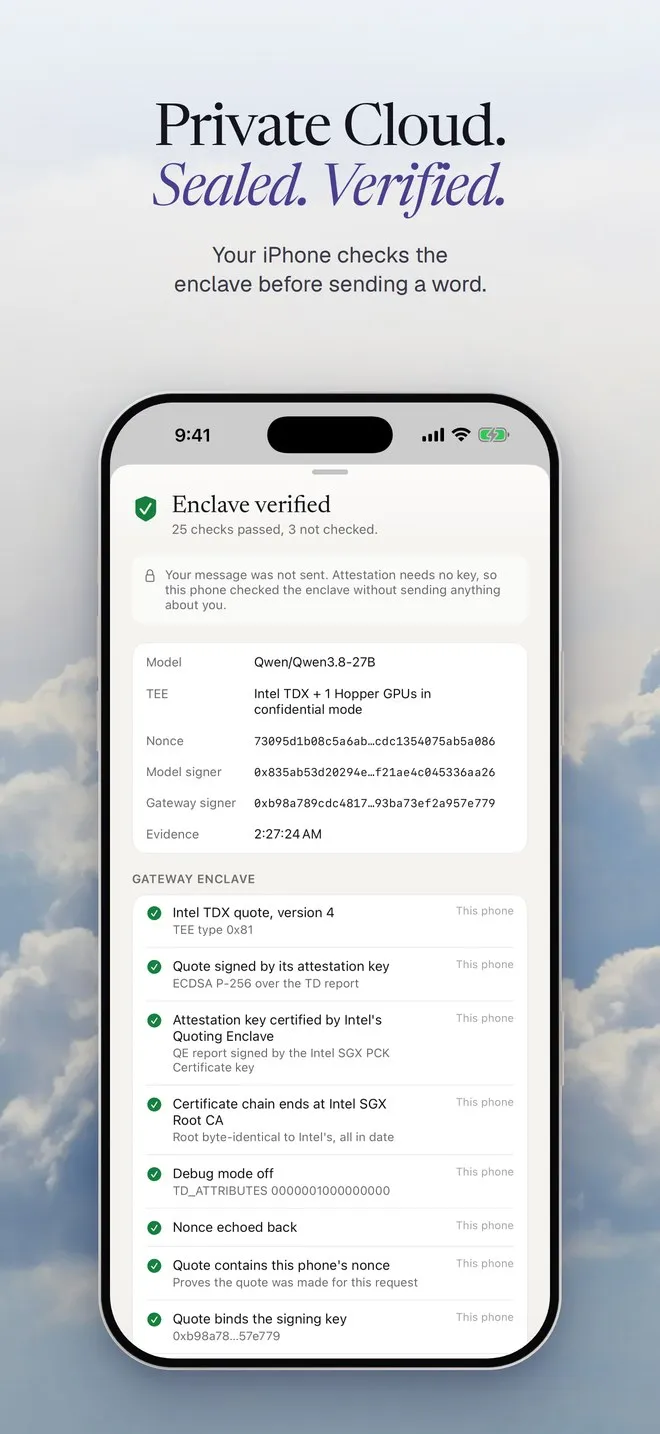
The title tells you how far it got:
| Title | What it means |
|---|---|
| Verified in a TEE | Every enclave check passed and every part of the reply was signed by the model’s enclave. |
| Enclave verified | The enclave passed, and no message was sent. You’ll see this without a key, or when today’s free messages are used up. |
| Enclave verified, reply signature missing | The enclave passed, but a signature for the reply didn’t come back. |
| Not verified | A check failed. |
The checks come in groups: This reply, Gateway enclave, Model enclave, and Not checked on this phone (or Mac). Under them, Measurements, from the model’s quote opens the raw values: MRTD, RTMR0 to RTMR3, MRCONFIGID and the compose hash. Check it again in NEAR’s Verification Center opens NEAR’s own checker for the same model.
Checked and not checked
Section titled “Checked and not checked”| Question | How your device answers it |
|---|---|
| Is the enclave real? | The TDX quote, Intel’s certificate chain to an embedded copy of Intel’s root, debug off, a fresh nonce, the signer, MRCONFIGID and RTMR3. |
| Are the GPUs real? | NVIDIA NRAS judges the GPU evidence. Your device checks the token’s signature, issuer, time and nonce. |
| Does my prompt go only to that enclave? | The server key must match the quote’s TLS fingerprint, and the prompt goes out on that same connection. |
| Is the answer the model’s, unchanged? | An EIP-191 signature over model:sha256(request):sha256(response) by the attested model key. |
Three things show as Not checked, so nobody reads more into the proof than it says:
- Intel TCB level and revocation. That needs Intel’s collateral, which the app doesn’t fetch. Our Python script checks it with
dcap-qvl. See Check it yourself. - Who built the container images. The quote pins their hash, not where they came from.
- The hop from the gateway to the model. The TLS check covers your device to the gateway. NEAR doesn’t yet prove which model instance served a request.
All of it in one picture
Section titled “All of it in one picture”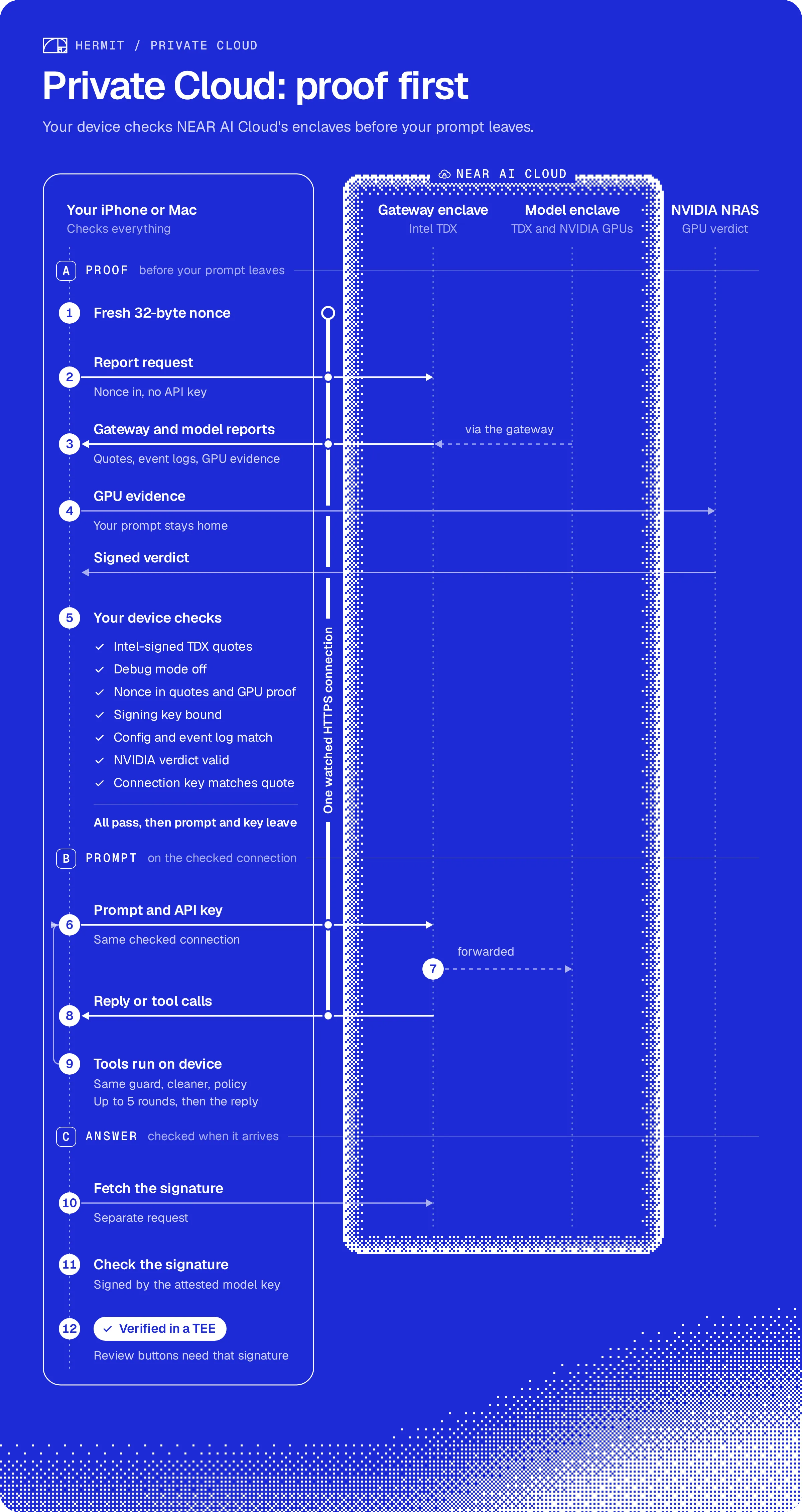
Your key
Section titled “Your key”Attestation needs no key, so the checks run even before you add one. Chat does need a NEAR AI Cloud key, which you add in Settings, Cloud. It’s kept in the Keychain on your device and only goes out after the checks pass. TestFlight builds may carry our shared key, good for 30 messages per device per day. The Private Cloud page has the rest.